Showing posts with label xbrl. Show all posts

Friday, 6 November 2020

Returning Tagged As Reported XBRL using an API

This is where you can see how a Company Reported their financial data but with tags to allow standardization, comparison and aggregation.

This is available to see in the Beryl Section Sheet. The API call brings back data as seperate records for each year but this is obviously more difficult to read and not how you would see it an report so the Power Query in the example sheet flips the years up onto the y axis of the Table as Columns. This can have the unwanted effect of inserting new columns into the sheet with each new call, as potentially each new column has different name depending on the dates of the years in question coming back from the filing.

To counteract that and to stop it getting messy basically!, we moved the Input Boxes from the top row to the first column. You can have the boxes wherever you want really. This sheet is an example, a starting point. As long as they build valid Queries, they can go wherever makes sense to you. You might want to create a separate opening sheet with all the parameters in for example.


This Call uses the items/section Endpoint to return an As Reported Filing Section.


By choosing the Relative option "123", it will bring back all the primary periods for Report and so will the results will come back looking like the face of the Income Statement if you say choose that Section.


Which section gets returned is determined by which Section you choose. A drop down in the example Section sheet shows you the sections you can choose as denoted by their codes but you can actually view any section that has XBRL Values in the report by selecting it by number. Just visit the Filing Sections sheet see which Sections are available for a filing.


Using an API Call to get an Overview of the XBRL contained in Filing

We have a very simple call that enables you to quickly see which sections of data are available as XBRL in a filing. This is particularly helpful when used in conjunction with items/sections Endpoint. That Endpoint brings back all the XBRL values disclosed in a chosen section along with all the presentational data to display it as it was reported (e.g. show me in the Income Statement for 2019. What you are looking at here when you do that is all the same XBRL used by the SEC to construct their Interactive Data pages for a filing.


Use the Endpoint sections as shown, choose a company in the Co Box and select a Date for the filing. You can also choose further along the row in the Annual? and Quarter Boxes whether you want to see the Annual Filing (e.g. 10-K or 20-F - just select "yr", otherwise "q") or choose which quarter you wish to see the filing for. By default it will bring back the annual filing.


The results, as shown above, give you a list of all the Sections by name and by Tag. Unlike (in theory!), XBRL Values, Sections returned from the SEC data are not tagged, very bizarrely, with a set of standard tags. So we have stepped in to supply our own Standard Section Tags and to make things even easier, especially when summoning a section, we've turned these into a series of short codes. You can see these displayed in the Code column when you a return list of Sections. Each Section is also numbered according to its display order (No). This is useful when summoning a more obscure Section that does not have a Code. Line_Total next to it will give you a handle on whether a Section is likely to contain any useful XBRL (Total lines of XBRL contained in a Section). You can also quickly verify that the data returned for a Section is as it should be by following the "Link" to the same page shown in SEC Interactive Data for a filing. It should be as the data source is the same - the XBRL filed at the SEC.

Thursday, 5 November 2020

Getting Tickers and Other Company Details Back with an XBRL API Data Call


There are three relevant Endpoints when trying to find a company to download.

1. cos/try (as shown above) enables you to search on a company name. Input at least five letters into the Company Box and it will return a list if matching companies when you refresh the query (Alt F5) as shown below.

2. cos/ will search by Ticker or CIK to return an exact match. In the case of a Ticker, it may return more than one result as it will show all the different companies that have used that Ticker since Companies have filed XBRL. The most common reason why two companies may have used the same Ticker would be where a company has morphed into a different legal entity so two companies, two CIK's. Don't worry when bringing back results we handle this by mapping the same Ticker to both companies to bring back a seamless series of results. Note: CIK's never change whereas Tickers for a company can.

3. cos/industry. You can use a SIC code with this Endpoint to bring back all companies with the same SIC. You could copy then SIC code for a target company into the industry box, select this Endpoint and the query will return all the companies operating in the same industry.


Wednesday, 17 June 2020

XBRL API Quarterly Data Call

As explained in our Getting Started guide, We have set up an Excel sheet to make it really easy to start quickly pulling data back using Beryl, our API. All you have to do is fill in the coloured boxes in any of the sheets and run the query to bring back a time series for your chosen data point.

An API call for quarterly data works in much the same way as for annual values. However to bring back Quarterlies, three more boxes come into play. except this time they are black.

 Black Boxes  - these either represent fixed elements of the API path or ones that have a small set of finite values so we have rigged them up as drop downs in Excel.


 Black Box  - Annual? Default value is "yr" but you can select "q" to see quarterly values instead.

 Black Box  - Quarter. Selecting "q" brings this box into play where you can select which quarter 1,2, or 3. You can also specify "123" to get all quarterlies for a year. NOTE: "12" etc will not bring back 1st and 2nd Quarters. Only "123" works for multiple quarters in a year. If this is set to "4", and the next box is set to "ytd", it will bring back the annual figures.

 Black Box  - YTD. Setting this to "ytd" as opposed to blank will bring back cumulative figures for the year - the Year To Date.

Orange Boxes work just like they do for annual amounts. So if you set the date to 2019, it will bring back the quarter you selected (e.g. 2) for the reporting year ending in that year. And if you set Years to 5, you will get a times series of quarter 2's going back 5 years.

Monday, 15 June 2020

Getting started with an XBRL API Data Call

(if you've stumbled across this article and want to know more, email us and I can add you to our beta programme)

We have set up an Excel sheet to make it really easy to start quickly pulling data back using Beryl, our API, or indeed, the XBRL US version.

All you have to do is fill in the coloured boxes in any of the sheets and run the query to bring back a time series for your chosen data point.

For our API you will need a token which you can get from our website by registering or signing in, which then goes in the Red Box.

To run the query, move to a cell in the grey area where the results are. Right click and choose refresh query or use the keyboard shortcut ALT F5. In Excel the API call is made using Power Query.


Green Box - Tag. Choose a data item by entering an XBRL tag. We have constructed a data set of the most commonly used tags that you are likely to need called the X Financials. These are listed on a sheet at the back of the Workbook. If you want to see all the tags you could possibly ever use! then got to an online XBRL Taxonomy (there are quite a few free ones around). I use the Workiva Wdesk Taxonomy Analyser. You can also just enter "All" in this box and it will bring back data for all the items used the companies you select.

Green Box - "All". If you don't know which tag to select or need to get familiar with the tags in use, you can put "All" in the Green Box as the Tag.. Be aware that if a value lies off the main axis (sorry getting a bit technical here), then these values will not get returned with this call. This only applies to more obscure values that might have been disclosed in a more complex table in the notes. A full explanation of axis and dimensions is explained in another article. Values on these axis will be made available in future. We want to make sure we do this in a meaningful way that doesn't bombard you with incomprehensive incomparable data


Orange Box - Date. Choose a year for the values that you want returned. It will get values from filings with a reporting period ending in that year. So specifying 20191231 will return values from a 10-K with a year end up to and including that date. If you just enter 2019, it will do the same. If you enter 20190630, it will bring back values for filing periods ending between 20190630 and 20180701.

Orange Box - Years. The other (optional) Orange Box, Years, determines how many years of values are bought back. So the Date box specifies the starting year and Years how many periods are returned in the series. If no Years are specified, it will bring back one year of values.


Blue Box - Cos. Enables you to specify which companies you want values returned for. This is where the beauty of modern Excel kicks in. Add a ticker to the bottom of the list and the Excel Table (The Blue Box) automatically expands to include it. Companies have to be specified by ticker, but don't worry if you haven't got the ticker at hand, you can quickly look them up using our API on the Beryl Cos sheet. You can always reduce the number of companies returned by pulling the Table back up to its original size using the triangular (ish) handle at the bottom right corner of the Table.

Also read - A Walk Around the Results Returned by an API Data Call (coming soon).


Friday, 26 April 2019

How does the new Excel Linked Data Type Stocks stack up?

Late in 2018 Microsoft rolled out a new concept - Linked Data Types. The first two types to be taken out of this shiny new box are Stocks and Geography. They are in effect connections to external cloud data sources with the initial connections curated using Microsoft Bing AI.


So are they any good? Well not surprisingly my interest is in the Stocks Data Type.

More info on how it all works and an introduction to what you can do with this Data Type can be found in the following links:

Office 365 Support - Excel data types: Stocks and geography

Strategic Finance - Excel: Stocks Data Type

Office Watch - Is Excel Stocks Data Type Premature?

I've been playing with this data on and off for a few weeks now and, going a bit deeper, I wanted to look at the good and the bad.

My interest was in using it as a front end stock selector for bringing back detailed XBRL financials from one of the APIs out there that enable you to do just that (try out the XBRL US API via our Excel template). These invariably work off a Ticker (or other identifier). But you don't always know the ticker so if the Stocks Data Type could magic up an instant ticker this would be a pretty nifty solution. And you can see it doing exactly that in this video.

So I tried this out on a handy but somewhat out of date list of 1000 bigger companies, essentially by converting this list of names into Linked Stocks (Select All/Click Stocks Data Type on the Data Ribbon)


I had a problem in roughly 300 cases (30%). 10% was due to the fact that some of these companies were no longer listed (merged/acquired etc). So lesson 1, Stocks only works with live companies (well I suppose it is stocks after all!). So I was down to a problem with 20%. For half of these (10% of the whole), it offered me some alternatives via the Data Selector Pane that pops up if no good match is found. What was surprising was it often offered me a choice when I felt it didn't need to e.g. Fox Corp; what was the clear cut choice was on the list and it should have gone straight for it, no quibbles, like it had for the other 80% of live companies.

And I got there in the end with the final 10% using a couple of strategies:
  • Feeding it a ticker instead (kinda defeated the point as this was supposed to be the output!)*
  • Removing words (taking it out "The", "Company", "Corporation", "LP" was particularly fruitful - funny kind of intelligence as you'd have thought removing noisy words would be the very first thing Bing did)
*Note you can be sure to get the correct quote more often by prefixing the ticker with the exchange followed by a colon or a two digit country code.

I was perplexed why for these 100 companies, it gave me no choices to pick at all. Take Deere & Co - I fed it John Deere and it give me not a single option.

Another thing to note with Bing is that it loves a bit of context. Feed it Ford and it gets stuck - is it Ford Motor Company or Forward Industries (Ticker = Ford) but put together a table of Auto Industry companies and add Ford underneath it and it uses its intelligence to automatically convert it to a new row containing Ford Motor Company.

All of this was done with data from their new supplier - Refinitiv (formerly known as Thomson Reuters before the Image Consultants got to work). They had to rather quickly change from their previous suppliers, Morningstar.due to data issues.

What's good about it is the functionality works really well. I like it. What lets it down at the moment is the AI and sometimes the data. The good thing is that the AI ,by its nature, will get better. When I first started asking Alexa to play songs by the British band James, she would torture me with songs by James Arthur. After admonishing her for several months for her crass stupidity, she finally learnt the error of her ways. I bet in a years time, Bing won't be quite so easily defeated by John Deere.

Missing data

Some surprises here given the quality of the source.

For example the employees figure for Fox was missing but I could easily find it elsewhere. Note you won't always realise the data is missing if you just look at the cards as these only show the values that are actually present.

A lot of data was missing for oil companies which was odd. e.g. Enterprise Products Partners has no industry classification. Peculiar as the industry classification system used by Refinitiv is TRBC (Thomson Reuters Business Classification) i.e. their own so you wouldn't have thought that any large companies would be unclassified.

Usage limitations?

A word of CAUTION. You will notice what looks like a thin little disclaimer appears when you first add a Linked Stock Data Type:

Financial market information is provided as is and not for trading purposes or advice.

Annoying enough that you have to click to remove this desktop hogging message but that's only the half of it. Its not a "stocks may go down as well as up" type of message or not just that old chestnut of how they can never be held responsible if you, heaven forbid, decide to trade on the bits of dodgy data that they never got round to cleaning up, that you yourself should have spotted.

As it says, click on the link and you will learn more about our data sources. And you will learn what not for trading purposes or advice really means. It means you LEGALLY can't use it to do these things, well certainly if you do it for a living or carry out any kind of financial function.


So this is all a bit confusing given that these professions are by far and away the biggest users of Excel. Do they tip toe round this functionality? Ordered not to use it by Legal on pain of death?

Whether this has any legal legs is I imagine debatable, given that you are not informed about this up front and this functionality is now baked into a product that to my knowledge has never had any hidden restrictions over what you could do with it before. I only looked because I'm in the financial information business so went sniffing around for this classic little stitch up.

So in theory, all you can do is look at it. So you have to question the point of it being in Excel at all. In practice I suspect you can get away with doing an awful lot more with it but you would have to question whether you could, say share a workbook with Stock Types in it or data derived thereof. Could this per se constitute advice?

Thursday, 17 January 2019

Why Verified and Adjusted XBRL is the Best Choice for Company Analysis

If you read my last post Do Extensions make XBRL Unusable out of the Box?,  you will know that using XBRL without adjusting the tagging could well be calamitous.

So what are your options? Well in the post before that Which Source of Company Financial Data should I use?, I set out the options for finding the best source for comparative analysis. Lets re-iterate them here but I'm also gonna add one further choice.

1. Lifting values straight from the Financial Reports filed by a company
2. Data Vendor - Bloomberg, Thomson Reuters, Capital IQ, FactSet etc
3. XBRL (unadjusted)
4. Verified and Adjusted XBRL (VAXBRL)

The first choice is only an option if you have ridiculous amounts of time. The second if you have ridiculous amounts of cash and you are willing to take the risk the data is completely error free and has been interpreted correctly. Vendor data by its nature has been handled by a third party so really needs to be verified if it is to form the basis of an expensive transaction. This is why it is never used as the primary source for in-depth company analysis in critical departments such as M&A.

My previous post explains the danger of using neat XBRL. Over half the Dow Jones 30 companies had used extensions in a way that could lead to significant errors in your analysis if you just plugged the raw XBRL into your model. Only 20% of companies had no extensions on the face of their Primary Financial Statements. And if the trend over the last five years is anything to go by (which I also examined in my analysis - I was interested to see what that fifth year of data might look like compared to the first), it not going to get any better.


There is a viable alternative. And it is not expensive. And by expensive I mean in terms of time, that most precious of commodities. VAXBRL. Just spend a little time verifying and adjusting the XBRL. This way you'll always know the provenance of the source (direct from the company). And with the right tools, it can become an easy and inherent part of your financial modelling process over which you will have complete control.

What you'll end of with is a set of financials better than any vendors at a fraction of the cost. Now that I think is what the XBRL revolution was supposed to be about.

Of course I wouldn't be telling you this if I didn't have a set of tools up my sleeve that might be just the job. Take a look at our totaliZd product. Download a totaliZd X Sheet at work (ready for adjustments). Yo can now also see a fully adjusted version of an X Sheet and video which I talk about in my next post.


Thursday, 10 January 2019

Which source of Company Financial Data should I use for my model?

If we want to create a model of a company's future performance, we need a starting point, a set of inputs which we can examine, adjust and extrapolate our best estimate of how we anticipate the company will perform in the future.

So what are our choices?


1. Lifting values straight from the Financial Reports filed by a company
2. Data Vendor - Bloomberg, Thomson Reuters, Capital IQ, FactSet etc
3. XBRL

I believe XBRL provides the best possible place to start. Why?

Well, as my old Physics teacher was never short of telling us, lets go back to first principles.

Our ideal starting point would be a perfectly accurate picture of how a company is performing right now. We can’t get this however for two reasons:

1. We don’t have real time access to companies accounting systems so we are constrained behind the curve by the reporting calendar.
2. We can only see the published external numbers, the numbers that the company allows us to see, subject of course to any legal disclosure requirements or the opinion of their auditors.

So even this, our best source, is inherently flawed, so we must be ready at all times to make adjustments/correct the figures put in front of us. Despite these caveats, the company still has to be our first port of call because only they have the closest and best view of the current operating performance.

So why would we use a data vendor?


Well their starting point is exactly the same but what they do is prepare the accounts for financial analysis. If you start from the Financial Reports filed by a company, preparing every single company this way is expensive, which is why they will charge you thousands of dollars for the privilege. Criticisms levelled at data vendors in the past have been that they don’t always get the figures right and that its not always clear how and what adjustments have been made.

Also a standardised approach can be problematic as the Corporate Finance Institute note:

“Companies such as Bloomberg, Capital IQ, and Thompson Reuters provide powerful databases of financial data. However, financial statements retrieved from these databases tend to be in a standardized format. Thus, if the company uses an accounting value unique to its business operations, you will not grasp it from data retrieved and it will affect your analysis.”

This is why in critical decision making, when an investment decision or M&A deal could be worth millions of dollars, vendor data would never be used as a starting point for a single entity centric model. Of course this data has value in screening and modelling whole markets or sectors but even here, for the reasons stated, they are potentially flawed inputs.

So what does XBRL bring to the party?


XBRL takes the effort out of lifting the financial values from the report and provides a first pass at standardization. Not normalization mind, but a first step in that process if your goal is vertical analysis against a company’s peers. As I discuss in this article, unfettered XBRL, as filed with the SEC and made available through Edgar or alternatively for a fee via the XBRL.US API, does not, nor indeed intend to, provide a perfect set of standardized values.

By harnessing the XBRL tagging, your models can be automatically derived from genuinely as reported values, the closest view of past operating performance direct from the company and untampered by any third parties. The hard graft of lifting values, monotonous, error prone and time consuming, is removed. But as I underlined above, this is not quite the finishing point. Most of the hard work is done but we must always be ready and prepared to make a few adjustments*. They will undoubtedly be required.

*How you can easily make these adjustments is discussed here and in the following video. If you want to read more about the need for adjustments in XBRL, then check out the next post in this series.

You can also read about totaliZd from Fundamental X here, our complete solution for preparing XBRL derived inputs to financial models in Excel.

Friday, 5 May 2017

Will there ever be less XBRL data items?

If you read my previous post, you will know that the arrival of the SEC US-GAAP Taxonomy unleashed a veritable tsunami of data items on a concerned body of filers and a bewildered bevy of investors.

So with so many data items milling around, you would have thought that someone or something might be sent out to clean it up. Well the good news is that in late 2014, the FASB launched the Xbrl Taxonomy Simplification Initiative.

And now the not so good news...


Looks good until you realise that this represents the rate of change. In other words you don't really want the blue line exceeding the red line. But you can actually see the impact of the 2014 initiative as the red line finally jumps above the blue one through 2015/2016 reaching a peak of 681 deprecated items in 2016. I have to say I still find it staggering that there are so many items to choose from given how few items companies actually disclose in their 10-K's and Q's.

So is there any way out of this forest? Well all is not entirely lost because in March 2017 the SEC finally agreed to allow foreign filers to use the IFRS taxonomomy. This is good on two counts. One it means that all foreign filers will for the first time be required to file XBRL which starts to answer the is it only for US Companies question (more on this later!) and two it establishes a precedent that a taxonomy does not have to have 16,000 data items.

The IFRS Taxonomy which is designed to satisfy the filing requirements of every country around the world, not just one large country, has only 4,610 items. It did have a lot less (47% less to be precise back in 2011 when it was originally scheduled to be mandated) but I think they were told to bulk it up a bit if they wanted to get SEC approval (sound of head banging on table). A group was tasked with adding items by custom or practice (and approx. 1,000 Common Practice items have been added since then). During this process no specific consideration is given to how useful an item's structural relationship might be - this is sadly not the philosophy behind either the IFRS or US taxonomy. Well at least 4,500 is a lot better than 16,000.

IFRS based XBRL is likely to be adopted for mandatory filing in Europe in 2020 and one would imagine the rest of the world will fall into line after that (completely answering the US Companies only question). Most of the world now uses International Financial Reporting Standards or has standards based on them.

I should point out that I am a member of the IFRS Taxonomy Consulative Group (ITCG). But this is not why I'm a relative fan of the IFRS taxonomy. It's just got less items in.

Tuesday, 2 May 2017

What do filers do with all the XBRL data items at their disposal?

This is the latest in a series of ponderings on whether the XBRL dream has come true?

In our XBRL to XL database, we have 20,000 data items that originate from the US-GAAP Taxonomies. That's a heck of alot of data items. Admittedly that includes alot of bumf that is just there for presentation or connecting stuff (abstract items) or axis (column headings) and items that have subsequently been deprecated. But compare that to S&P Compustat's 500 odd or the 1600 data items we use for our standardisation routines.

I guess the FASB were worried about companies using extension tags, although perhaps there are more direct routes of limiting i.e. prohibiting extensions.

Of course the more there are, the greater the risk of mistakes. Choosing the wrong item over another in the same section is not easy to detect. Usual validation routines won't pick it up. And none of this stuff is audited. Ultimately it is up to the company, or whoever they've outsourced their XBRL tagging to, to pick it up.

The kinda advice stressed by Ernst & Young on the release of new taxonomies is typical and not surprising.

"As they move to a new taxonomy, companies should review their practices for selecting XBRL tags and thoroughly search the tags in the new taxonomy".

So what value do we as users get out of all this wonderful detail?

Well lets have a look at disclosure levels for our probably over the top standard data set of 1632 items (lets refer to this set as the standidZd 1600. So a couple of weeks ago I did a chop of our SEC XBRL to XL database (powers XBRL sheet) to check on item usage. I thought it would be interesting to look at usage for our reference set of industrial companies we established when looking at filing histories (seeing our standiZd 1600 was designed explicitly for non financial companies). Keeping everything consistent with all our other data sampling in this series, I only included 10-K's but all the 10-K's they've ever filed in XBRL. I should stress that this is before we've applied our standardisation routines.


So what is this table telling us? That 263 of our standiZd 1600 have NEVER been used by any of the top US industrial companies. And a whopping 65% of what we regard as the most comparable individual data items have been used by 5% or less. So if we were trying to compare any one of these 1000 odd items, we would have at best only 11 other companies (and roughly on average probably only six) to compare them with. Lets hope a couple of them happen to be in the same sector! And we can probably forget about creating any meaningful aggregates for these items.

What happens if we widen it right out to the total population of US-GAAP tags and the total population of companies. Not surprisingly it gets uglier. 10,000 of US-GAAP tags appear in 5% or less of the total number of 10-K filings made to date (approx. 50,000). And roughly only 1,000 items appear in more than 5% of these filings.

This isn't a perfect piece of analysis as some items have come and some items have gone (but that has been happening by and large around the margins of the taxonomy)

So it's probably not too unreasonable to conclude 20,000 data items is drastic overkill for comparative analysis and that our 1600 standiZd data items IS over the top! We will certainly take a close look at those 263 items to see if we need to rename! this set downwards.

So what use does this disparate tagging have? Well it does allow us to easily find the rare occasions where particular tags have been used but because use is so rare, it probably has no real advantage over them just being tagged using extensions. A simple text search, although not as neat would be just as effective, if not more so as it would pick up all (the right or wrong) occasions when an extension has been used instead.

All this prompts the question - will there ever be less data items?

Tuesday, 25 April 2017

Building Xbrl sheets from scratch (using our query engine)

Who are we to tell you how to analyse a company? That's why our Xbrl example spreadsheets are merely that - examples. The tech behind it is simple, been around for years (ie. works!) and is easy to deploy. The examples provide a starting point and hint at what's possible. You build on them to create a custom sheet that meets your specific analytical needs or you can start from scratch.

So how do I build a sheet from scratch? Well watch this short video.

And these videos will also give you a flavour of how to customise existing queries as they demonstrate the example sheets in use.

You can add bells and whistles like set them to automatically update when you open a sheet or provide extra layers of automation by incorporating them in a VBA macro to fully harness the power of Excel.

Friday, 3 March 2017

How to screen for the very latest filings in Excel

Now EDGAR is very good at showing you all the latest filings. But I wanted to take it a step further in my analysis of XBRL filings for the 2017 10-K reporting season. I also wanted to do it in Excel. By the way, this is all part of the Has the dream come true? series of posts and videos which you can follow starting from here.

If you have read my previous posts, you will know I have set up a control group of companies so we can see for real in this reporting season what we can and can't do with XBRL. Now I've needed to be able to monitor those filers, just as if they were my portfolio of potential investments. So we've added a watchlist feature to Xbrl sheet. Technologically, it's just a variation on the existing queries you can run in Xbrl sheet. It uses the same query file but you set different parameters to do some very powerful screening of the latest flings at the SEC.


Great thing about Excel data queries is that you can set them up to run whenever you want automatically, so when you open your workbook or indeed at regular intervals, say every hour.


You won't always know which companies your wish to watch so we've covered that by adding the ability to screen by filing date. Say for example, show my every company that filed yesterday (whisper it but you can actually search down to the latest minute so you could set it to show you all those that filed in the last hour for example. We update our database from the SEC in real time so as soon as it's available on EDGAR, it's available in Xbrl sheet). Not only that, you can filter by industry to build a peer group of real time filings. You can specify a particular SIC code or a wider range to pick a bigger industry grouping or search by filer (i.e. find filers in the same industry as your chosen target).


Anyway this video shows you how to do all that. And once you've identified a filing, you bring down all it's XBRL tagged data using the same mechanism in Xbrl sheet.

And there's an example sheet to play with here.


Friday, 10 February 2017

Has the dream come true? - show me how I can see 10 years of XBRL data

This is the latest installment in what seems to be turning out to be a series - catch the start here - has the dream come true?

After my last post, I thought I really ought to show you all this data. Provide the evidence as it were. We've just added a few new bits and pieces to Xbrl Sheet so I also I thought it would be a good way to bring you upto date with what we've being doing over at XBRL to XL.

So it looks like this.


And you can see how I created this in next to no time (and how you can do the same) here.

And if you just can't wait and want to get hold of the data in a hurry for Neflix (or any company), you can download the Xbrl Sheet from here. Just pick up a token from the website and fire away.


Friday, 3 February 2017

Has the dream come true - Is there enough XBRL?

If you missed the introduction, then you can go back to this post.

I think I'm gonna end up tackling the "enough" question alot. Today as we stand at the beginning of the 2017 10-K reporting season, lets for now just narrow it down to the question of history.

Throughout this examination of the validity of XBRL today, I want to keep it as real world as possible, so a lot of my work in the coming weeks is gonna be working with a subset of companies from that most popular of general US indices - the S&P500. So I'm gonna draw from approx. 250* constituents to see if we can get closer to an answer.

*No I haven't just halved the index! I didn't want to work with financial companies as that just makes my life harder and I wanted to just look at companies that were going to lodge 10-K's in the current reporting window. Conveniently that left me with 256.

So before any reporting for 2017 began, we had (Source: XBRL to XL Database):


Which means not surprisingly, given how long XBRL has been a requirement, pretty much the entire population already has a five year history (not 100% as not all constituents were listed when XBRL filing started). That's a good start but even more excitingly, nearly 60% of this index population is suddenly gonna have 10 years of data! As the majority of their data points will now stretch back 10 years for the first time by the end of this reporting cycle. Companies are required to disclose 3 years of income and cash flow data (in each filing) so 8 filings will take you back 10 years for period items (9 years for balance sheet items).

In fact 4 companies (chevron corp, fluor corp, newmont mining corp, united technologies corp) had already filed 10'K's 8 times so this year will have a complete 10 year history.

10 years has always been regarded by analysts as the kinda historical period you can properly get your teeth into. The theory being that it equates roughly with an entire macro-economic cycle - from boom to bust.


Tuesday, 31 January 2017

And so has the dream come true?

Seeing I thought I had some stuff to say and I hadn't bloggged for far too long, I thought I'd look back at my early posts. When I started back in 2011, 2,000 companies had made their first fledgling filings. Now 11,000 plus companies have made over 170,000 filings (Source: XBRL to XL database). Now that we are swimming in a sea of XBRL, are we living in a world where analysis is easy, accurate and free (well cheap at least!)?

When XBRL started, there was a tremendous euphoria that we were on the cusp of analytical nirvana. The first mandatory filing season quickly burst that bubble. XBRL it appeared (or certainly the FASB/SEC implementation) wasn't all it was cracked up to be. Those problems are well documented but all the same I thought it would be worth listing them here to see what if anything has changed. Has nirvana sailed back into sight or is it still a case of manana?

So why couldn't I use XBRL?

There wasn't enough of it. If I'd only got a few 10-K and Q filings, how could I do any meaningful historical analysis?

There was too much of it! Over 16,000 tags, but I'm only interested in two or three hundred data points at the most!

It was complicated. A lot of the interesting numbers that were being structured for the first time were held in weird structures - multi-dimensioned hypercubes. And what the hell is a tuple?

I couldn't access it. Yes I could go to the SEC website and download it for free but then what? It certainly wasn't playing nice with Excel which was somewhat of a surprise for structured data.

This structured data didn't have any structure. Why could I get a tagged figure for Revenues for Google but not for Microsoft. How does that work? And what was I meant to do with extensions which seemed to allow Filers to bypass completely any semblance of standardisation that might exist.

So apart from too little data, too much data, obscure complicated structures, poor accessibility, evanescent structures, extensions, what else was wrong?

...Oh did I mention the errors? Filings in the early years were plagued with errors. The top three spots on the podium of errors were taken in reverse order by missing required values (like err, earnings per share), negative values (due to yet another layer of complication) and right at the top, invalid axis combinations?? Exactly! (Filers were tying themselves up in tuples trying to dimension this stuff). The most oft cited error - the mis-used extension didn't even get a look in. Pushed way off the rostrum by more basic booby traps.

So given what I've just said, the next question might seem a little rhetorical - could I trust the source? There ought to have been a simple answer to this question. Something along the lines of yes. I was no longer having to deal with a middle man to get my structured data (a vendor), it was being signed off by the company and of course audited. Except it wasn't - the audited accounts were a separate filing, the html 10-K. The xml XBRL was in a seperate file which wasn't audited and for which the Directors had no liability.

I've mentioned the missing data values but I haven't mentioned the missing data. Not everything was being xbrl'd. It only applied to the financial statements and accompanying notes. Not for example the MD & A (Management Discussion and Analysis) into which companies often like to lob a lot of interesting and important values. And yes the 10-K got the treatment but not the preceding earnings announcement.

So apart from too little data, too much data, obscure complicated structures, poor accessibility, evanescent structures, extensions, errors, unaccountability, missing tranches of data, was there anything else?

Well...it was only for US companies and so in an increasingly globalised world in which the conventional orthodoxy of free trade prevailed and your competitor could be on the other side of the world then even if you managed to straighten out your data you might not have any companies to compare all this comparative data with. So is it possible that Donald Trump could be the saviour of XBRL?

Realising that Donald Trump is not a satisfactory answer to my question (or indeed any question for that matter), I will address each of these issues in turn in my next few posts to see whether this dream is still giving analysts nightmares. For now I've run out of blog.

Wednesday, 18 February 2015

The SEC Structured Data Sets - uh?

This SEC Announcment may have slipped your notice, as it was slid out at the back end of last year when certainly my thoughts were more about parties than databases. The SEC announced that some of that mountain of XBRL data that's been piling up on their computers is now available as a series of flat files. The Data Transparency Coalition certainly thought it was significant.

So what are these Structured Data Sets and what does this all mean for accessing Comparative XBRL data for financial analysis? By bulking it up and stripping out the markup they've made part of the XBRL filing data more accessible but with a number of caveats. Note I said "more accessible" and not "accessible". You can't open these files in Excel - you might think you can because they are tab separated flat files but actually you can't; they are too big. They are designed to be read into a database (from whence they come). So if you quickly just want to get hold of some tagged data for a few companies from the SEC, you're out of luck. Note you can also load the XBRL instance document into Excel as XML but that doesn't make it any more readable.

But it is now much easier to read them into an database. Yes you still need to build an intermediary database. But you don't have to worry about context references and dimensions and all that messy XML tagging. e.g. In an existing XBRL filing I might find 43 values for "Revenues" but which is actually the one I want? In the flat file, num.txt, there will probably be just 3 values - one for each of the primary financial periods.

Of course you don't have to build your own database - because we built one earlier! So if you quickly just want to get hold of some tagged data for a few companies then you can! We thought it would be an interesting exercise in evaluating the worth of this pilot program. We found it relatively easy and we like what we see. We chose to add a little pre-processing to the files, to make the resulting database run more efficiently and coalesce better with our existing ones.

Our copy can be accessed in exactly the same way as all our data - through Excel. A simple web query brings the data into a sheet according to the parameters you supply. It works just like the existing XBRL Sheet. The query is available here and the example XBRL Sheet here. You can also find a video here that shows you how to get started with the example sheet. Probably worth pointing out that because access is simply through the rendering of a customisable web page - the web query, access isn't confined to Excel; many other applications and programming languages can interface with this.

So what are the caveats? It is only data from the Financial Statements themselves that are in these files. Nothing from the Notes to Financial Statements for now and new files only appear once a quarter. And it is just as it was filed - there are no corrections in these data sets.

In the next couple of posts I'll talk more about the technical aspects, our implementation and the current limitations of this initiative.

Monday, 2 February 2015

Dealing with XBRL data issues part 1 - missing totals

As can be detected from the title, there are numerous issues, many of which in reality are (or can be seen as) positive features of XBRL! I'm gonna deal with each of them one by one by demonstrating the various strategies we use to create comparative data.

I first touched on this in an earlier post and explained what was then our rather clumsy solution to the problem.

Missing totals mean missing standard values when trying to do comparative analysis. They are missing because XBRL preserves the presentation that companies have always used to show their financial performance, namely the succinct and more readable presentation you see in a paper report. Why would you want to repeat a figure just to create a complete set of totals? There's no need, it will only create clutter and make it less readable.

Fortunately we can do something about this and we do in the latest version of XBRL Sheet (the latest version is not yet generally available so email us - jimtruscott@fundamentalx.co.uk - if you would like to start using it). You can find more info on XBRL Sheet in this post and you can watch XBRL Sheet solving the missing totals problem in this video.

Lets have a look at an XBRLSheet download...


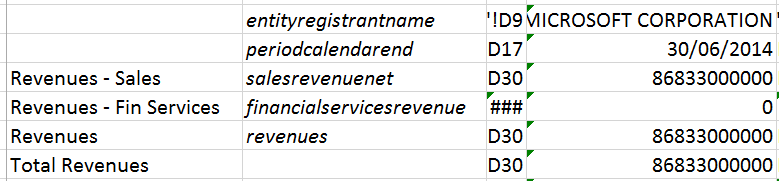
Before we used to download one column of tags, now we download two! The 1st column contains the standard tags which is our understanding of the high level tag that the company should be using in a "Standard" rendition of the values. This will usually marry up with the actual tag they used (in column 3) as per line 4 - Cost of Revenue in the example above. But if they have been more specific (which is great as more precise tags gives us a better understanding of their business), then we supply the different high level tag as well (which they haven't used as they would have to duplicate the line, creating a cluttered presentation as discussed above). So line 3 - Revenues is a case in point. Microsoft used the more specific tag "SalesRevenueNet". To make these easy to spot and check if necessary, the different standard tag will appear in a different colour. So we see another one further down. Again we may be interested in quantifying all provisions when a business is restructured rather than just goodwill. These two different tags enable us to do this.

So how do we use this info in our model? Well as we always recommend (see this post - specifically the bit about transparent data), you should connect with this data via an intermediate sheet (see below), to create values that can plug straight into your model.


Now with this extra column, we don't need to create a calculation to catch all the multiple alternatives for revenue (as represented by the Total Revenues line); we just need to use a simple lookup on "revenues" in this new column and the values will appear as shown. The 2nd column above contains the tag that is looked for. We in fact do a double lookup - we look in both tag columns in the Filings sheets to make sure we never miss an item and this also allows us to pick up the specific values if we want as well (e.g. the Revenue - Sales line). The names in the 1st column by the way are our names for the items and demonstrate how having an in-between sheet enables you to customise the data before it hits your model.

Friday, 24 January 2014

Fixing errors in XBRL Instance documents again

You can find a previous example in the post "Fixing errors in XBRL Instance documents" and an introduction to XBRL data errors here.

The next example is a little more subtle. Wrong but not immediately obvious, unless you are trying to model some business sectors, perhaps using our Sector3 product! - find loads more info on our award winning product here.

Boeing in their 2012 10-K slightly changed the tag for one of their top level business segments in one of the sections showing data for their businesses. It was referring to exactly the same segment (the label i.e. the description was the same) but the tag was different. A mistake - someone wasn't paying attention. In fact with reference to the previous example, they created an entirely bogus "context" for this identical segment.


So we got rid of it, replacing all connections to it with the correct context reference (shown below). In fact there was more than one wrong context so they all went the same way.


There was a little more work to do here than previously as a tag comes with a panoply of associated data - labels, definitions & the like, all of which we felt it was prudent to remove. Details were as ever recorded in the "xsd" file as shown below.


The consequence of this error was that data was missing for assets in Boeing's Defense, Space And Security business. Well it isn't anymore in Sector3.

Thursday, 23 January 2014

Fixing errors in XBRL Instance documents

(Should be read in conjunction with the post – XBRL Data Errors)

In my last post, I talked about the different XBRL errors that you could possibly encounter. And we at Fundamental X are going to fix errors in the first two categrories (XBRL formatting errors & stupid mistakes) whenever we come across them.

This approach suits us as the data we currently output to Excel via XBRL to XL and Sector3 is generated on the fly from the original instance documents filed with the SEC. And we figure there are a lot of people out there who prefer to deal with the original documents rather than data that’s been mangled through a database.

XBRL formatting errors are rare. Stupid mistakes made in the creation of the XBRL filing are not (Invalid Axis Member Combination, one of the XBRL US classifications of this type of mistake, currently sits at the top of the error leader board) so I’m going to focus on these.

The following two examples should give you a flavour of the nature of these errors and how we will fix them.

Texas Capital Bancshares 2012 10-K

If you look at the Document and Entity Information in the interactive data on the SEC site, you immediately see the problem:


The "Document Period End Date" and the axis date don't match. That's because the date for this filing hasn't been updated in the XBRL from what is more than likely a previous XBRL filing (you can double check that the date is indeed incorrect by referencing the html 10-K), Therefore the dates for the most important contexts in the entire filing are wrong. At this point our processing software throws a wobbly and we fix the error in the instance document. Seeing it is an elementary error in the XBRL, it seems judicious to fix it in the source rather than further down the processing and storage road.

Of course this kind of error should be bought to the attention of the SEC and the company concerned. The filing will not be corrected but I think an additional amended 10-K/A would be filed instead. But markets wait for no man.......

So what do we do? Well here is what the error looked like in the XBRL:


So we changed the date in the context (and all other relevant contexts) and corrected the context name to reflect the change. At this point all references to this context also needed to be changed. It's important to note that we didn't re-create the XBRL filing as we want to retain the integrity of the existing filing, so we merely amended it. All changes are noted at the top of the file involved and all file changes are summarised in the xsd file as shown below:


The amended files are then used in preference to those on the SEC site when generating XBRL to XL products.

I feel this post is getting a little tedious so the second example will have to wait till the next post. You can download the amended XBRL instance document for Texas Capital Bancshares in it's entirety from here.

XBRL data errors

I’m going to talk here about actual errors rather than data issues (a whole different topic worthy of a ream of posts by itself). So we are talking here about stuff that is just plain wrong (rather than data that just might need some proper treatment).

XBRL US, to their credit, monitor this all very carefully and clinically. They have divided errors up into 32 types (If we've got a 16,000 plus data set, better make sure we have a similarly impressive number of error types to go with it!).

I guess though I would classify all these errors into four categories:

Errors in the XBRL formatting – you should never see these as the filing would fail the compliance tests on submission although according to the XBRL US stats they do exist - "Filing is Invalid XBRL" in the link above.

Stupid mistakes – often made because the filer quite understandably uses the last filing as a template e.g. period date is wrong.

Erroneous values – seeing the figures are more often than not pasted or automatically transposed from the html filing (this believe it or not is how most XBRL filings are created!!), the absolute values shouldn’t be wrong but the sign or scaling factor could be.

Incorrect or questionable tagging – could either be down to the wrong US GAAP tag being used or the inappropriate use of an extension.

There are various financial data providers out there who can and will fix this type of error in their databases but if like me you prefer to deal with the original documents then what to do?

Well we’ve decided to fix some of these errors in the instance documents themselves. The next post will explain exactly what we are talking about here, by way of a couple of examples.